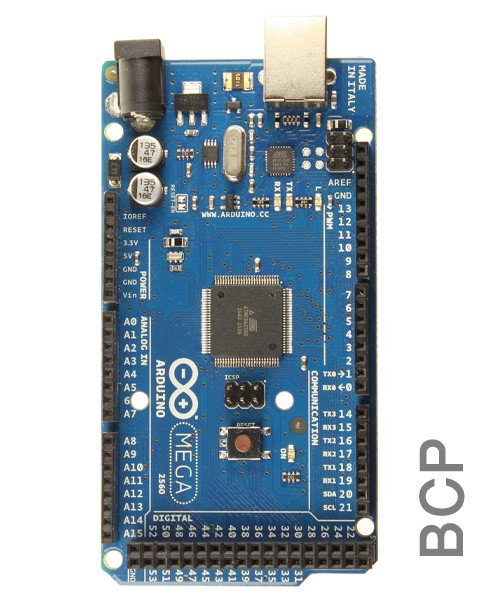
Arduino Mega Price in BD
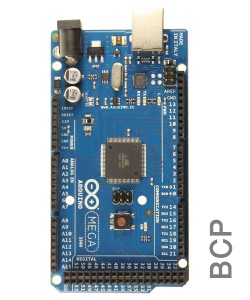
First, I have to mention that-, this is the low-cost Chinese version of Arduino Mega 2560 R3 from China with the same feature, pinout diagram, and board size.
But, if you are only the quality concern people, then please check the genuine version of Arduino Mega 2560 R3 from SparkFun, USA. This high-quality PCB Board and all of the genuine components give you a quality performance.
The Arduino mega price in bd of a Chinese version is about 4 to 5 times lower than that of the genuine copy.
Chinese copy vs genuine copy of Arduino Mega?
Some unscrupulous businessmen are selling the Chinese copy of Arduino Mega and marking it as the original. Please don't get into the trap. If anyone claims the Arduino as the original copy, please go to the Arduino official website and check the store name on the distributor list or not?
As you can find the name of TechShop Bangladesh on the distributor list of SparkFun, USA. Which is the authentic distributor on Arduino.
We are strongly committed to serving our passionate fans with the best quality products. All of the products of our store are QC PASSED by our expert Engineers.
Technical Specifications:
Microcontroller: ATmega2560
Clock: 16MHz
Flash Memory: 256KB
SRAM: 8KB
EEPROM: 4KB
Operating Voltage: 5V
Input Voltage: 7-12V DC
I/O Pins: 54 (of which 15 provide PWM output)
ADC: 16
LED_BUILTIN: 13
Length: 101.52mm
Width: 53.3mm
Weight: 37g
Arduino Mega Datasheet:
Eagle Files
Schematics
Board Size In .DXF
Arduino Mega Driver:
This version of Arduino Mega uses CH340 as a USB to Serial Converter. So it is mandatory to download the driver for CH340. But don’t worry, this is so simple and you have to do this just once.
If you are an embedded system lover, then this driver will be required for most of the devices that you are working with.
How to Program?
To start programming with Arduino Mega 2560 first, you have to download and install the Arduino IDE from the official website. Simply, select the COM-Port according to the port generated on Device Manager after connecting the Arduino Mega on your computer via USB Cable A to B.
Now from the Arduino IDE menu, go to Tools > Board: > Arduino / Genuino or Mega 2560. Write your program or go to File > Examples > Basics > Blink or as you want. Press the Upload button from the IDE.
That’s all. Enjoy!!!
From where I can start learning?
By searching on google or youtube, you can find huge resources and tutorials. Also, you can follow the tutorials and references on the official website.
Packaging
1 x Arduino Mega 2560 - R3
1 x Plastic Base Plate
Need help?
All of our Engineers are ready to serve you. If you have any queries, please don’t forget to through a comment in the bellow or simply make a phone call to 09678110110 from 09.00 am to 08.00 pm (7 days a week). You can also join us via Live Chat and Facebook Inbox.